

Tips
| Cleaning your HardBody CD/DVD storage gear is simple. If you have a velvet finish, like the inside covers of all our disc holders, use a soft suede brush or sticky tape to clean dust and particles. If you have a PVC finish, simply clean it with water and a soft cloth. |
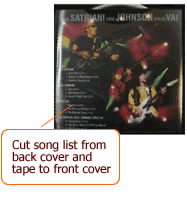 Using the Double-Dip Pockets for Song I.D. Using the Double-Dip Pockets for Song I.D.As you know, our Double-Dip Pockets are designed to give you the ability to store your discs and disc covers, but one of our customers, Michelle from Hong Kong, told us how she took our design one step further. "What I do is cut out the song list from the CD's rear cover, tape it to an open area on the CD's front cover and then slide that into the clear pocket of the page. I can easily identify the disc AND the songs on the disc." GREAT IDEA MICHELLE!!!!! Thanks for sharing it with us! |
 Handling and Cleaning Your Discs Handling and Cleaning Your DiscsOur Double-Dip Pockets are designed to give your discs MAXIMUM protection from scratching and dust, but you should make sure to treat your discs properly for optimal playback. You should avoid touching the disc surfaces, and always hold the disc by its edge, never write on your disc with permanent marking pens, keep discs out of direct sunlight, make sure it is at room temperature before playing, and always keep your discs stored in your HardBody gear when not in use to ensure it remains clean and dust free. Inside each HardBody case is a H3 Dust Free Disc Cleaning cloth for cleaning your discs. Simply use this cloth to gently wipe away dust and particles from the non-labeled side.(This is the side that contains the data. You will find that some DVDs contain data on both disc sides. In this case both sides of the discs are without a label). When wiping your discs clean, wipe from the center out to the edge and do so in straight lines (not in a circular motion. Also remember to NEVER use solvents (like paint thinner, benzene, photo or record cleaners, aerosol spray or abrasive cleaners) to clean your discs. |